Best Data Restore Software to Recover Lost Data From Hard Drive

Home  /  SSD Data Recovery

Msata SSD Data Recovery Software

A versatile & feature-rich tool to retrieve formatted, deleted & corrupted data from SSD.

  • Permits to recover selective or complete files and folders
  • Capable to extract hard/permanently deleted data from Msata SSD
  • Allows recovery of exFAT, NTFS & FAT (16,32) formatted Adata SSD
  • Recover corrupt data files from Msata SSD into the healthy file format
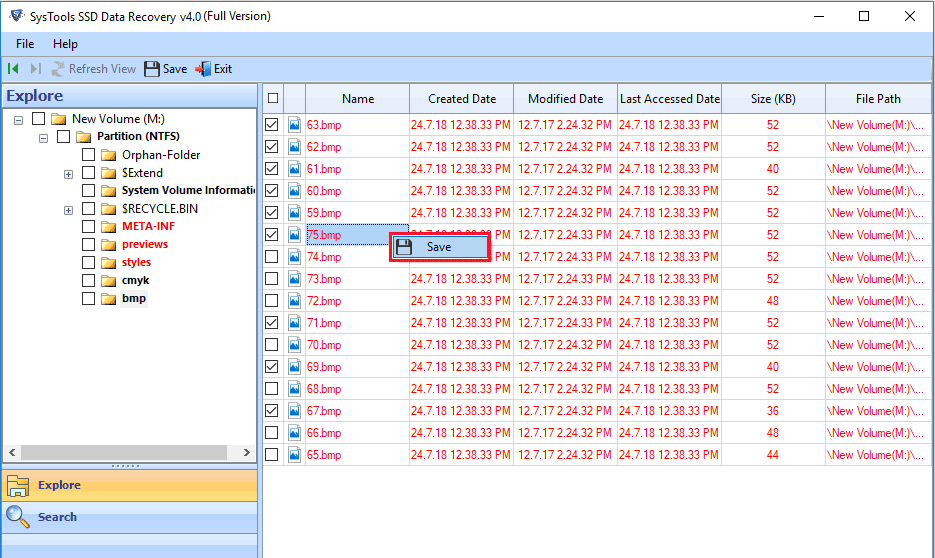
  • Software generates a preview of retrieved data files with attributes
  • Recover files and folders from a formatted SSD without any limitations
  • Restore images, videos, multimedia, documents, etc. from Msata SSD
  • Supports to recover deleted, corrupted, & formatted data from Dynamic SSD
  • Allows to recovering damaged files from GPT & MBR partitions of SSD Drive
  • Search any specific file within recovered files via Advanced Search feature
  • Tool shows permanently deleted data in red color it easy to identify
  • Works with hard deleted, corrupted, and formatted partition recovery
  • Compatible with Windows versions 10/8.1/8/7 and all the lower versions

SUPPORTS TO RECOVER ALL BRANDS OF SSD DRIVE

Samsung SSD

Crucial SSD

Kingston SSD

SanDisk SSD

Toshiba SSD

FEATURES OF MSATA SSD DATA RECOVERY SOFTWARE

Hassle-Free Data Recovery From Msata SSD

With Msata SSD Data Recovery Software, the user can easily recover hard or permanently deleted data from SSD without any issue. Once the data is recovered the user can extract and save the data at the desired location on the system.

Recover Deleted Files & Folder from Msata SSD

Sometimes, the user accidentally deletes important files and folders from the SDD. Recovering deleted data from Msata SDD is a complicated task. But, with Msata SSD Data Recovery, the user can retrieve deleted files and folder SDD in just a few clicks.

FAT and NTFS Partition Recovery

The user can also recover data from adata SSD supporting FAT and NTFS file system using the software. Adata SSD data recovery is integrated with advanced functionalities which makes easy for the user to implement the data recovery task from SSD.

Renders Advanced Search Option

Adata SSD data recovery advanced Search option, the user can search for any specific files within the recovered data directly from the software interface. It makes easy for the user to look for a particular file among tons of files in an effortless manner.

Extract Selective Files & Folders

After the completion of the Adata SSD data recovery process, the user can preview the recovered data from the software’s dashboard. The user can export any of the selected file or folder and save it to the desired location on the system.

Detect SSD Automatically

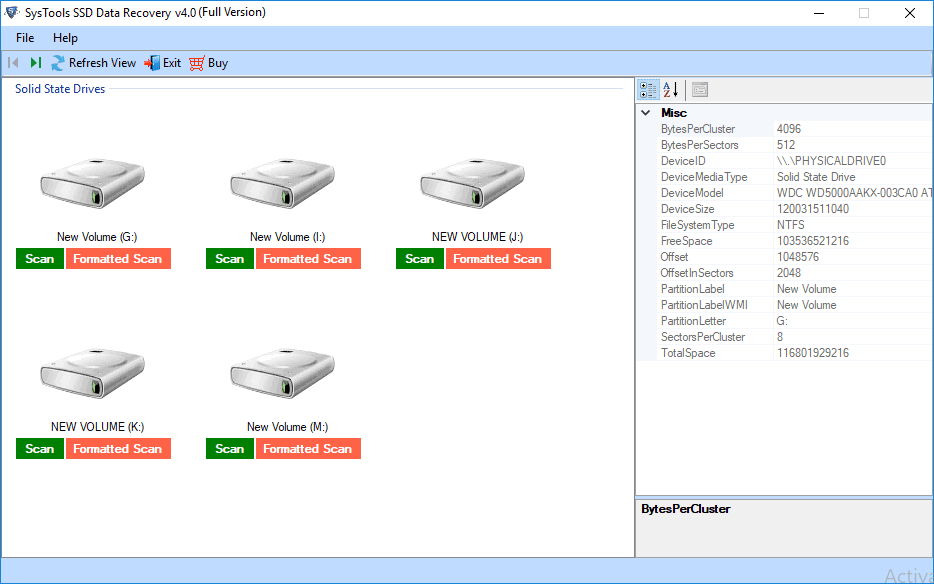
Adata SSD data recovery Software is capable of auto-detecting the SSD drive connected to the system and list it into the software panel. The user just needs to select the recovery type and the SSD to recover data.

MSATA SSD DATA RECOVERY SOFTWARE SCREENSHOTS

Step 1 – 4 : Download & install Msata SSD recovery software on your computer.

Step 2 – 4 : Now software provides two data recovery options to choose any one

Step 3 – 4 : Preview complete details of recovery process with all attribute.

Step 4 – 4 : Save the restored data at any location on computer.

ONLINE VIDEO OF MSATA SSD DATA RECOVERY SOFTWARE

FREQUENTLY ASKED QUESTIONS

To recover corrupt data from SSD using the Adata SSD data recovery, the user has to follow the steps given below:

Step 1: Download and install Msata SSD Data Recovery tool

Step 2: Now, select the Scan Mode for SSD

Step 3: View recovered SSD data from the tool’s interface

Step 4: Select destination location to save recovered data

Yes, with Adata SSD data recovery tool, the user can easily recover hard/permanently deleted data such as images, documents, videos, etc. from the Msata SSD.
Yes, Adata SSD data recovery is integrated with the Advanced Search option which makes it hassle-free for the users to search for a specific file within the recovered data.
Yes, Msata SSD Data Recovery tool is compatible with Windows Operating system. It works with Windows 10/8.1/8/7 and all the below versions.
Yes, the user can easily extract selective file/folder after the recovery process. The user just needs to select the data he/she wants to extract.
No, the software is designed with robust data security algorithms. So, there is no risk of the security breach issue while working with the tool.

WHAT USERS SAYS

Recently, my SSD data got corrupt and I was not able to access my files and folders. I was stuck badly in this situation. Then one of my friend suggested me Adata SSD Data Recovery to recover corrupt data from Adata SSD. With this utility, I recovered all my corrupted files from SSD without any complication. The user interface of the software is very easy to use and the tool is loaded with numerous features. Thanks for introducing such a brilliant tool.

James Hook, New York

With Msata SSD Data Recovery, I was capable to recover permanently deleted images and documents from Msata SSD in just a few clicks. The software is associated with amazing features which made it easy for me to implement the task. Moreover, I am not a technocrat, still, it was effortless for me to work with the software due to its user-friendly interface. The unbeatable speed and robust performance of the software are impressive.

Rose Hudgens, Italy

Scroll to Top